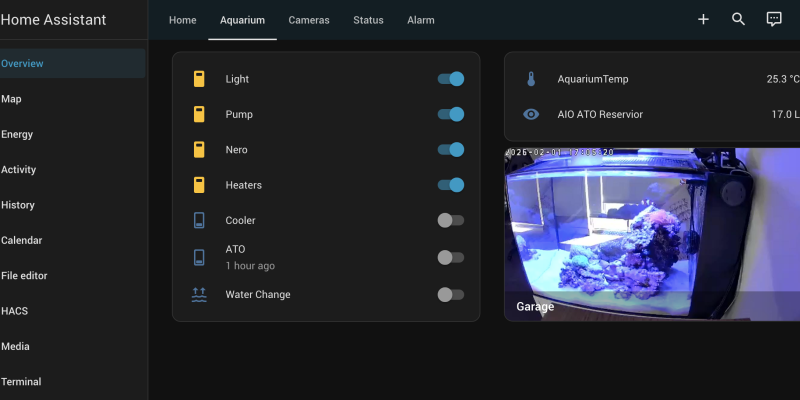
I have been running a Waterbox AIO 25 Peninsula for a while now and wanted to share my equipment and automation setup that keeps everything running smoothly. This build focuses on reliability, clean aesthetics, and smart control using Home Assistant.
Equipment Overview
The tank sits on its matching Waterbox stand, which has just enough space for cables, controllers, and easy access during maintenance. Here is the gear I am currently running:
- Temperature control: Inkbird ITC‑306A and Aquael Ultra 100 W heater
- Filtration: InTank Chamber 1 Media Basket with Pinky Filter floss and Seachem Matrix (1 L)
- Lighting: AI Blade Grow, managed through the Aqua Illumination app on its own schedule
- Flow: AI Nero 3 powerhead for adjustable, randomised current
- ATO: Tunze Osmolator 3152.000 with a custom run schedule for safety
- Cooling: Jecod ACF‑200 Auto Cooling Fan, automatically triggered via Home Assistant when temperatures rise
- Monitoring: Repurposed Plaato keg scale tracking the ATO reservoir’s weight, plus temperature monitoring and alerts
- Safety: A Tapo water leak sensor inside the stand to detect any leaks early
- Smart control: Tapo smart powerboards and sockets, plus a Tapo Button for feed mode and a Tapo Hub to connect the button and leak sensor
- Maintenance tools: Tunze Care Magnet Nano and a jump guard
Smart Power and Control
There are commercial aquarium controllers like the Neptune Apex or Hydros Control, but they become very expensive once you add probes, modules and branded powerbars. My goal was to get similar functionality for a fraction of the cost by combining affordable hardware with Home Assistant.

Instead of a dedicated controller like an Apex, I use Tapo smart powerboards to power all the main equipment. These are integrated with Home Assistant, which lets me build custom automations for safety, maintenance and day‑to‑day operation.
The Tapo Button and leak sensor are low‑power Tapo devices that require a Tapo Hub because they do not connect directly over Wi‑Fi, they pair to the hub which then bridges them into the network and Home Assistant.
Feed Mode Button
A Tapo Button is mounted near the tank and handles my Feed Mode. The button itself talks to the Tapo Hub, and from there an automation in Home Assistant does the rest
- A single press turns off the return pump so food stays in the display instead of going down the filter.
- After 15 minutes, the pump automatically turns back on.
This simple workflow makes feeding fast and hands‑off.
ATO Scheduling and Safety
The ATO runs only during scheduled 2‑minute windows throughout the day. This means that even if a float switch stuck or something went wrong, it could not overfill the tank because it would time‑out quickly.
If I manually trigger the ATO during the day, another safety rule still shuts it off after 2 minutes.
Temperature and Cooling
The Inkbird ITC‑306A manages heating but also gives me a reliable temperature signal I can use in Home Assistant. If the tank temperature gets too high, Home Assistant turns on the Jecod ACF‑200 Auto Cooling Fan and, if needed, cuts power to the heaters as part of the safety automation.
Leak Detection and Alerts
Inside the stand I run a Tapo water leak sensor that links back to the Tapo Hub and into Home Assistant. If it ever detects water where it should not be, I get an immediate alert and can also have automations cut power to selected outlets as a precaution.
Between the leak sensor, the temperature monitoring and the Plaato‑based reservoir monitoring, I get early warning for overflows, overheating and low top‑off levels.
Maintenance Mode
For water changes I use a Maintenance Mode automation in Home Assistant. When I start a water change:
- Pumps, heaters and the ATO are all turned off.
- I can drain and refill without worrying about equipment running dry.
Once I am finished, a single action restores everything back to normal operation.
Holiday Mode and Auto Feeding
When I am away, an auto feeder takes over feeding, with a slightly more involved automation stack behind it.
- The feeder is connected to a Raspberry Pi that runs Node‑RED.
- A Home Assistant automation publishes an MQTT message when it is time to feed.
- Node‑RED receives that MQTT message and triggers a relay wired to the Raspberry Pi, which activates the feeder motor.
- Before feeding, Home Assistant turns the Nero 3 pump off, then turns it back on after feeding so food stays in the display.
This sequence runs twice a day while I am on holidays and keeps feeding consistent without manual input.
Monitoring and the Plaato Scale
For ATO monitoring, I use a repurposed Plaato keg scale sitting under the ATO reservoir. It continuously measures the reservoir’s weight, which lets me track water usage and trigger accurate low‑level alerts.
Because the official Plaato cloud service is no longer available, I stood up a local Plaato server using Docker, based on the open‑source project open‑plaato‑keg. This replaces the original cloud backend on my own network, keeps the scale fully functional, and exposes the data so I can integrate it directly with Home Assistant.
I also monitor tank temperature in Home Assistant and send alerts if it ever drifts too high or too low. As an extra safety layer, if the temperature climbs past a defined limit the automation will turn off the heaters and switch on the cooling fan, adding redundancy on top of the Inkbird’s own protection logic.
Wrapping Up
The Waterbox AIO 25 Peninsula is already a great all‑in‑one tank, but combining it with Home Assistant, Tapo devices, a Plaato scale and a Raspberry Pi has turned it into a very capable smart aquarium. I get many of the features people look for in high‑end controllers like Neptune Apex, but using more affordable, flexible components that I can extend and customise over time.